Dilution Calculator (C1V1 = C2V2)
Enter three of C₁, V₁, C₂ and V₂ to get the fourth, the diluent to add and the dilution factor, with every step shown.
Popular tools
- Molarity CalculatorFind the mass to weigh out, the molarity of a solution or the molarity of a concentrated stock; type a formula or the molecular weight.
- PPM Calculator (Parts per Million)Convert ppm to ppb, percent and mg/L, work out ppm from the amounts you weighed, or convert gas ppm to mg/m³.
- Ligation Calculator (Insert : Vector Ratio)Enter the vector and insert lengths, the vector mass and the molar ratio to get the insert mass and the reaction volumes.
- Hemocytometer CalculatorType the cell counts of each square you counted to get cells per mL, viability and total cells.
How to use the Dilution calculator
- Choose a value in Solve for: V1 (volume of stock to use), C1 (stock concentration), C2 (final concentration) or V2 (final volume).
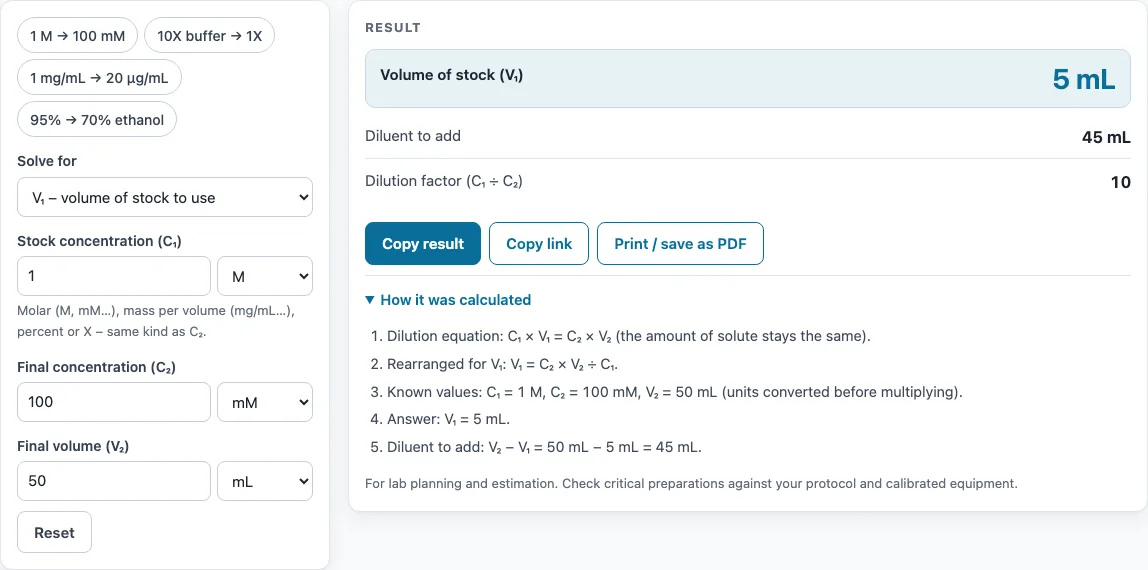
- Enter the other three values. To start faster, click a preset: 1 M → 100 mM, 10X buffer → 1X, 1 mg/mL → 20 µg/mL, or 95% → 70% ethanol.
- Choose the unit for each value. C1 and C2 must be the same kind of unit (both molar, both mass per volume, both percent, or both X). Volumes can be L, mL, µL, US gallons or US fluid ounces.
- Read the result: the unknown value, the diluent to add (V2 − V1, in the unit of V2) and the dilution factor (C1 ÷ C2).
- Check for warnings. The tool warns if C2 is higher than C1, if the dilution factor is above 1,000 (a serial dilution is suggested), or if V1 is below 0.5 µL.
- Open How it was calculated to see the equation, how it was rearranged, the known values and the answer with units.
Click Copy result to copy the result lines and a link. Copy link copies the page address, which holds all your inputs, so opening it restores the same calculation. Print / save as PDF prints the inputs, results, steps and the date.
What is the dilution equation (C1V1 = C2V2)?
The dilution equation is C1 × V1 = C2 × V2. C1 and V1 are the concentration and volume of the stock solution. C2 and V2 are the concentration and volume of the diluted solution. The equation holds because a dilution adds solvent but no solute, so the total amount of solute stays the same. When both concentrations are molarities, the same equation is written M1V1 = M2V2.
How do you calculate a dilution?
Rearrange the equation to isolate the unknown. The stock volume is V1 = (C2 × V2) ÷ C1. The final concentration is C2 = (C1 × V1) ÷ V2. The other two forms are C1 = (C2 × V2) ÷ V1 and V2 = (C1 × V1) ÷ C2. Make sure C1 and C2 are in the same units before you divide. For example, with C1 = 1 M, C2 = 100 mM and V2 = 50 mL, convert 1 M to 1000 mM. Then V1 = (100 × 50) ÷ 1000 = 5 mL.
What is dilution and concentration?
Concentration is the amount of solute in a given volume, such as mol/L (molarity), mg/mL, percent or X. Dilution lowers the concentration by adding more solvent to the solution. The dilution factor is C1 ÷ C2, and it shows how many times weaker the new solution is. In the example above, 1000 ÷ 100 = 10, so the final solution is ten times more dilute than the stock.
How much diluent do I add?
Add V2 − V1. Measure V1 of stock, then add diluent (water or buffer) until the total reaches V2. In the example above, 50 mL − 5 mL = 45 mL of diluent. The tool shows this value in the result, in the same unit as V2.
Can I use different units for C1 and C2?
Yes, as long as both are the same kind of unit. Molar units can be mixed, so C1 can be in M and C2 in mM or µM. Volumes can also differ, such as V1 in µL and V2 in mL. The tool converts all units before it calculates. Molar and mass-per-volume units cannot be mixed, because converting between them needs the molecular weight. The tool shows an error message in that case.
Sources
Formulas and data used by this calculator (checked October 2026):
Worked examples
| Input | Result |
|---|---|
| C₁ = 1 M, C₂ = 100 mM, V₂ = 50 mL | V₁ = 5 mL (add 45 mL diluent) |
| C₁ = 10 X, C₂ = 1 X, V₂ = 500 mL | V₁ = 50 mL (add 450 mL diluent) |
| C₁ = 1 mg/mL, C₂ = 20 µg/mL, V₂ = 2 mL | V₁ = 40 µL (add 1.96 mL diluent) |
| C₁ = 95 %, V₁ = 70 mL, V₂ = 100 mL | C₂ = 66.5 % (add 30 mL diluent) |
| C₁ = 5 M, V₁ = 2 mL, C₂ = 0.5 M | V₂ = 20 mL (add 18 mL diluent) |
Calculated by the tool above with these values.
Frequently asked questions
How do I dilute a 10X buffer to 1X?
Set C1 = 10 X, C2 = 1 X and V2 to the final volume you need. For a final volume of 500 mL, the result is V1 = 50 mL of 10X buffer plus 450 mL of diluent.
Is the dilution calculator free and does it upload my data?
Yes, it is free. It runs entirely in your browser, nothing is uploaded, and no sign-up is needed.
Can I use the results in commercial work?
Yes. The volumes, steps and printouts are yours to use in any work, including commercial work such as SOPs, batch records, reports and product documentation. No attribution is needed.
What do the warnings mean?
They flag values that need a second look. If C2 is higher than C1, a dilution cannot raise the concentration, so check your inputs. If the dilution factor is above 1,000, a serial dilution is usually easier. If V1 is below 0.5 µL, it is too small to pipette accurately, so make an intermediate dilution first.
Are percent dilutions of ethanol exact?
No. Ethanol and water contract when mixed, so the volumes do not simply add up. Percent dilutions of ethanol with water are only approximate.
Why does the calculator show an error when I mix molar and mg/mL units?
Converting between molar and mass-per-volume units needs the molecular weight of the solute, which this calculator does not ask for. Enter both concentrations in the same kind of unit, or convert one first with the concentration converter.
Related tools
- Dilution ratio calculator: use it when you need the ratio of stock to diluent rather than a volume.
- Serial dilution calculator: use it when one dilution step is too large and you need a series of steps.
- Molarity calculator: use it to find the molarity of a solution before you dilute it.
- Concentration converter: use it to convert a concentration from one unit to another.
- Alcohol dilution calculator: use it for dilutions of ethanol, where mixing is not exactly additive.
- PPM calculator: use it when your concentrations are in parts per million.
- Cell seeding calculator: use it to work out how many cells to plate in a given volume.
- All laboratory calculators: use it to browse every calculator on the site.