Cell Seeding Calculator
Enter your cell concentration and the seeding density or cells per well to get the suspension and medium to mix.
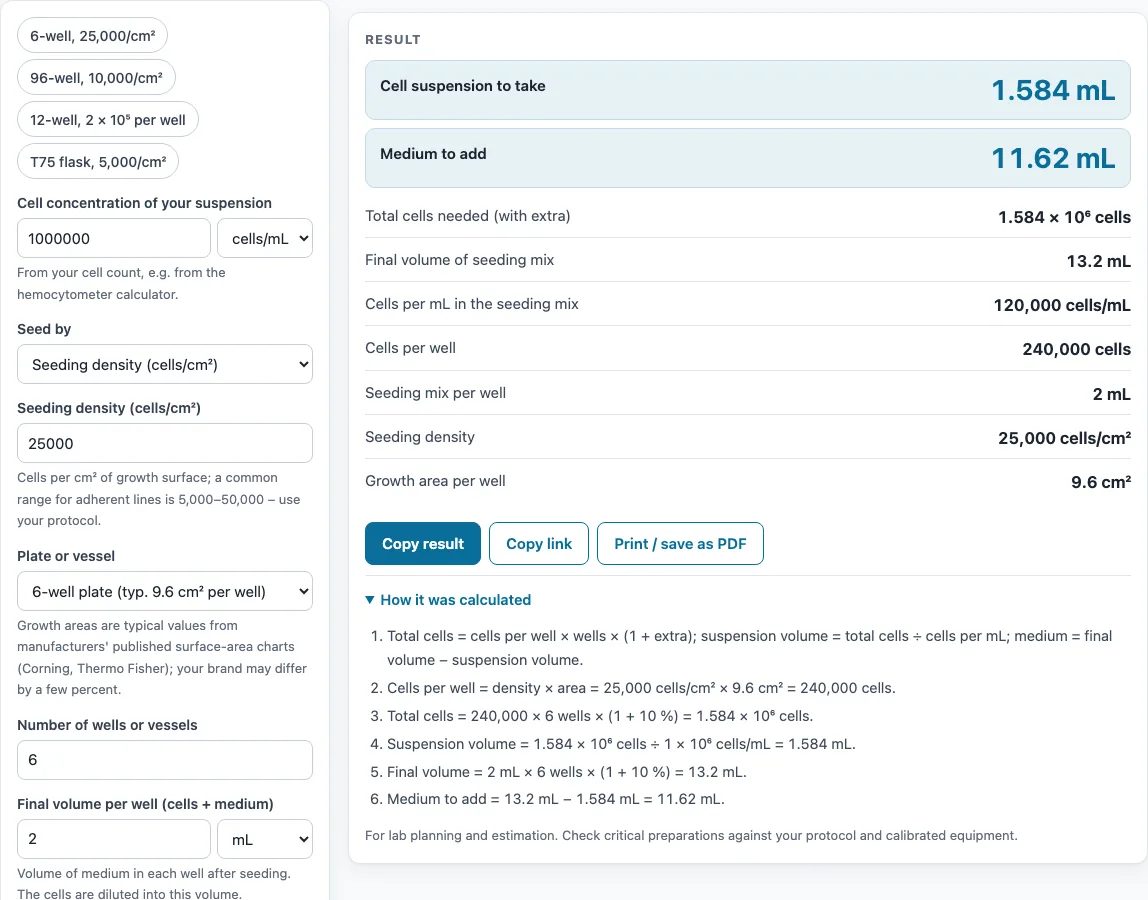
How to use the Cell seeding calculator
- Enter the cell concentration of your suspension. Choose the unit: cells/mL, 10⁶ cells/mL, or cells/µL. Get this number from a cell count, for example with the hemocytometer calculator.
- Choose how to seed: by seeding density (cells/cm²) or by cells per well.
- Enter your seeding density or cells per well.
- Select a plate or vessel format, such as 96-well, 6-well, 35 mm dish, or T75. For a non-standard vessel, enter a custom growth area.
- Enter the number of wells or vessels.
- Enter the final volume per well (cells plus medium).
- Check the extra % for pipetting loss. It defaults to 10 %.
- Read the results: suspension to take, medium to add, total cells needed, final volume, cells per mL of the seeding mix, cells per well, seeding mix per well, seeding density, and growth area per well.
- Read any warning. If one appears, change your inputs before you plate.
Under the result, “How it was calculated” lists the formula and each step with your numbers. Copy result copies the result lines and a link. Copy link copies the page address, which stores every input, so the same calculation reopens later. Print / save as PDF prints your inputs, results, calculation steps, and the date.
How do you calculate cell seeding density?
Seeding density is the number of cells you place on each square centimetre of growth surface, written as cells/cm². Multiply it by the growth area of one well to get the cells per well. Thermo Fisher’s Gibco table, for example, lists 0.3 × 10⁶ cells for a 6-well plate well of 9.6 cm², about 31,000 cells/cm², but your protocol and cell line set the correct value.
How many cells do I seed per well?
Cells per well equals seeding density multiplied by growth area. If you choose to seed by cells per well, you enter that number directly. The total number of cells for the plate is cells per well × number of wells × (1 + extra %).
How do I dilute cells for seeding (cell dilution)?
Divide the total cells by the concentration of your suspension to get the volume to take. Then subtract that volume from the final volume of the seeding mix to get the medium to add. Final volume is the volume per well × number of wells × (1 + extra %). This is the same idea as a dilution calculator, applied to a cell suspension.
If your suspension is too dilute to fit the needed cells into the final volume, the tool warns you. Spin the cells down, then resuspend them in less medium, and recount.
Mix the seeding suspension well before you dispense each well. This keeps the cell number the same in every well.
What is the surface area of a 6-well / 96-well plate?
A 6-well plate has about 9.6 cm² of growth area per well. A 96-well plate has about 0.32 cm² per well. The tool uses the values in Thermo Fisher’s Gibco “Useful numbers for cell culture” table. Brands differ by a few percent, so use your plate’s specification if your protocol needs exact numbers.
Why add extra volume when seeding?
Some of the suspension stays in pipette tips, tubes, and reservoirs. The extra % adds cells and volume to cover this loss, so each well still receives its full share. The default is 10 %. The tool warns if you set it above 50 %. Also, if you take less than 1 µL of suspension per well, the volume is too small to pipette accurately, and the tool warns you about that too.
Sources
Formulas and data used by this calculator (checked October 2026):
Worked examples
| Input | Result |
|---|---|
| 240,000 cells per well × 6, suspension 1 × 10⁶ cells/mL | take 1.584 mL of suspension, add 11.62 mL medium |
| 3,200 cells per well × 96, suspension 2.5 × 10⁶ cells/mL | take 0.1352 mL of suspension, add 10.42 mL medium |
| 200,000 cells per well × 12, suspension 1.5 × 10⁶ cells/mL | take 1.76 mL of suspension, add 11.44 mL medium |
| 375,000 cells per well × 1, suspension 800,000 cells/mL | take 0.4688 mL of suspension, add 11.53 mL medium |
Calculated by the tool above with these values.
Frequently asked questions
Does it work for suspension cells?
Yes. Choose “Cells per well” (or per flask) instead of a seeding density and enter the number of cells you want in each vessel; the growth area is then only shown for reference.
Which unit should I enter my count in?
Use whatever your counter gives: cells/mL, millions of cells per mL (10⁶ cells/mL) or cells/µL. A count of 1.2 × 10⁶ cells/mL can be typed as 1.2 with the 10⁶ cells/mL unit, or as 1200000 or 1.2e6 with cells/mL.
Is anything I type uploaded?
No. The calculation runs in your browser, there is no account, and the inputs are only stored in the page link if you copy it.
Can I seed several plate types at once?
Run the calculator once per plate type; each result has its own suspension and medium volumes. Copy link keeps each setup, so you can reopen it at the next passage.
Why does the tool say my suspension is too dilute?
The cells you need will not fit into the final volume at your current concentration. Spin the cells down, resuspend them in less medium, and count again. Then enter the new concentration.
Can I use the results in reports or SOPs?
Yes. Results may be used freely in commercial work, including reports, SOPs, quotes, and product documentation. No attribution is required.
Related tools
- Hemocytometer calculator: use it first to get the cell concentration from your cell count.
- Doubling time calculator: use it to work out how fast your cells grow between passages.
- Dilution calculator: use it for general dilutions of stock solutions and reagents.
- Serial dilution calculator: use it when you need a series of stepwise dilutions.
- RPM to RCF calculator: use it to convert centrifuge speed so you can spin down your cells correctly.
- All laboratory calculators: use it to browse every calculator on the site.