Hemocytometer Calculator
Type the cell counts of each square you counted to get cells per mL, viability and total cells.
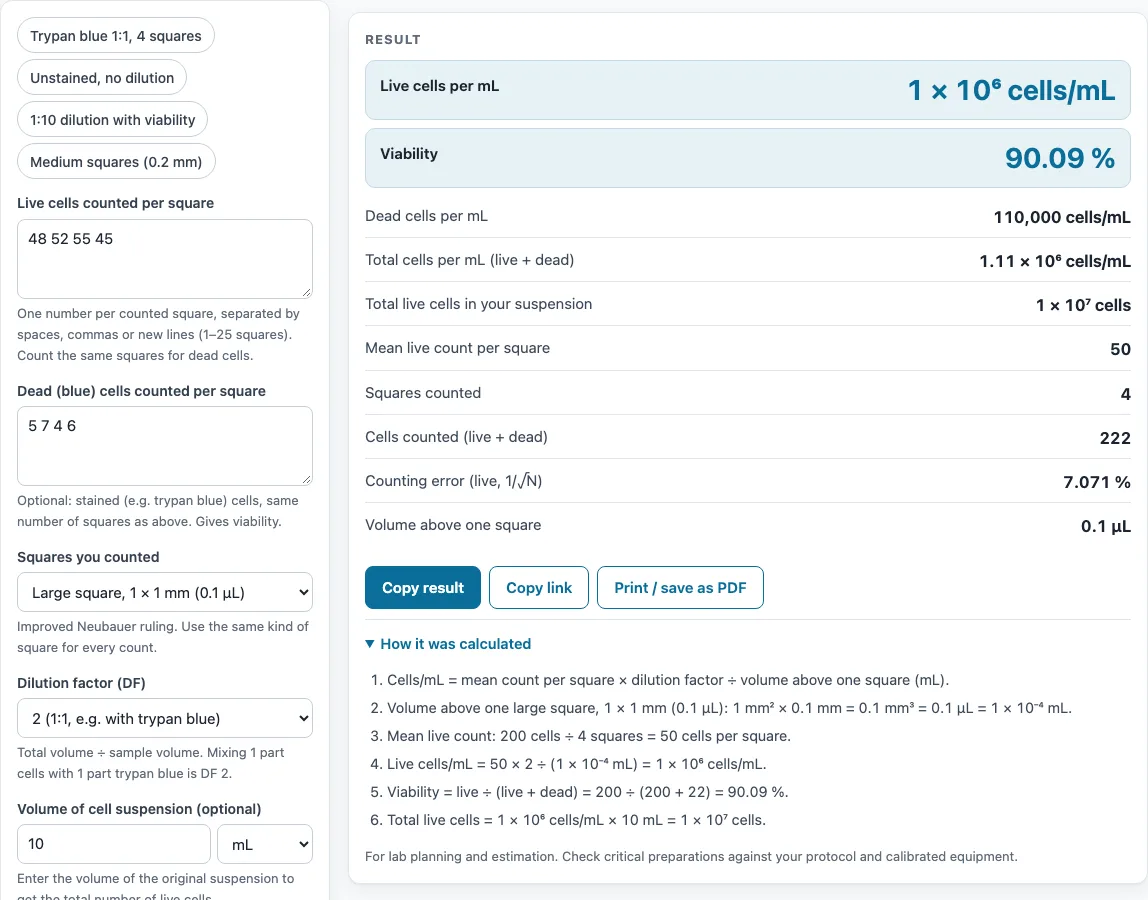
How to use the Hemocytometer calculator
- Select the square type that matches your chamber: Large (1 × 1 mm), Medium (0.2 × 0.2 mm) or Small (0.05 × 0.05 mm). If your chamber depth is not 0.1 mm, open More options and change it.
- In the live cell box, enter the count for each square you counted. Separate the numbers with spaces, commas or new lines. You can enter from 1 to 25 squares.
- Optionally, enter the dead (blue) counts for the same squares, in the same order, to get viability.
- Choose a dilution factor: 1, 2, 5, 10, 100 or a custom value. Mixing 1 part cells with 1 part trypan blue gives a factor of 2.
- Optionally, enter the volume of the original suspension to get the total number of live cells.
- Read the results: live cells/mL, viability, dead cells/mL, total cells/mL, total live cells, mean per square, squares counted, cells counted and counting error. Check any warnings before you use the number.
- Open “How it was calculated” to see the formula with your own numbers. To try the tool first, click one of the presets, such as “Trypan blue 1:1, 4 squares”.
Copy result copies the result lines and a link. Copy link copies the page address, which stores all your inputs (after ?s=), so the same calculation reopens later. Print / save as PDF prints the inputs, results, calculation steps and the date.
What is the hemocytometer formula?
The hemocytometer formula converts a count from a few squares into cells per mL: cells/mL = mean count per square × dilution factor ÷ volume of one square in mL. The mean count per square is the total cells counted divided by the number of squares counted. The dilution factor is the total volume divided by the sample volume, so mixing 1 part cells with 1 part trypan blue gives a factor of 2.
The volume of one square depends on its size and the chamber depth. A large square is 1 × 1 mm and the chamber is 0.1 mm deep, so its volume is 0.1 mm³, which equals 0.1 µL or 0.0001 mL. Dividing by 0.0001 is the same as multiplying by 10,000 (10⁴), so for large squares the formula becomes mean × dilution factor × 10⁴. For medium squares (0.004 µL) the multiplier is 250,000, and for small squares (0.00025 µL) it is 4,000,000.
How do you calculate cells per mL from a hemocytometer count?
First, count the cells in each square. Add the counts and divide by the number of squares to get the mean. Multiply the mean by the dilution factor, then by the multiplier for your square size.
For example, 4 large squares with a total of 200 live cells give a mean of 50. With a dilution factor of 2, the result is 50 × 2 × 10⁴ = 1 × 10⁶ live cells/mL. For medium squares, a mean of 11.2 with a dilution factor of 1 gives 11.2 × 250,000 = 2.8 × 10⁶ cells/mL.
Count cells that touch the top and left lines, but not those touching the bottom and right lines, so no cell is counted twice. Count enough squares to reach at least about 100 cells in total. The counting error is 1/√N, where N is the number of cells counted: 100 cells give about 10%, and 200 cells about 7%. If the squares are too crowded to count reliably, dilute the sample further.
Sources
Formulas and data used by this calculator (checked October 2026):
Worked examples
| Input | Result |
|---|---|
| 4 squares, mean 50, Large square, 1 × 1 mm (0.1 µL), DF 2 | 1 × 10⁶ live cells/mL, viability 90.1 % |
| 5 squares, mean 11.2, Medium square, 0.2 × 0.2 mm (0.004 µL), DF 1 | 2.8 × 10⁶ live cells/mL |
| 4 squares, mean 98.75, Large square, 1 × 1 mm (0.1 µL), DF 10 | 9.875 × 10⁶ live cells/mL, viability 95.6 % |
| 4 squares, mean 31, Large square, 1 × 1 mm (0.1 µL), DF 4 | 1.24 × 10⁶ live cells/mL |
Calculated by the tool above with these values.
Frequently asked questions
How do you calculate the dilution factor with trypan blue?
Divide the total volume by the sample volume. If you mix 10 µL of cell suspension with 10 µL of trypan blue, the total is 20 µL and the sample is 10 µL, so the dilution factor is 2.
How do you calculate cell viability?
Viability (%) = live cells ÷ (live + dead) × 100. For example, 90 live and 10 dead cells give 90 ÷ 100 × 100 = 90%. Enter the dead counts in the dead box and the tool calculates this for you.
How many squares should I count?
The tool accepts 1 to 25 squares, but it warns when you count only one, because a single square gives a poor estimate. Counting four large corner squares is a common choice. More squares reduce the counting error.
What is the volume of a hemocytometer square?
A large square (1 × 1 mm) holds 0.1 µL with the standard 0.1 mm depth. A medium square (0.2 × 0.2 mm) holds 0.004 µL, and a small square (0.05 × 0.05 mm) holds 0.00025 µL. The volume is length × width × depth.
Why do my counts differ so much between squares?
Differences much larger than random variation usually mean the cells are clumped or the chamber was loaded unevenly. Mix the suspension thoroughly, reload the chamber and count again.
What does the counting error mean?
The counting error, 1/√N, shows how much random variation the count has. It gets smaller as you count more cells. A high error means the result is less precise, so count more squares or adjust the dilution.
Related tools
- Cell seeding calculator: Use it after you have a cell concentration, to work out how many cells to plate per well or flask.
- Doubling time calculator: Use it to estimate how fast a culture grows from cell counts taken at two time points.
- Serial dilution calculator: Use it when you need to dilute a sample in steps to reach a countable cell density.
- Dilution calculator: Use it to work out how much stock and diluent to mix for a target concentration.
- Dilution ratio calculator: Use it to convert a dilution expressed as a ratio into the dilution factor you need.
- RPM to RCF calculator: Use it to convert centrifuge speed to relative centrifugal force before you pellet cells for counting.
- All laboratory calculators: Use it to browse every calculator on the site.