Ligation Calculator (Insert : Vector Ratio)
Enter the vector and insert lengths, the vector mass and the molar ratio to get the insert mass and the reaction volumes.
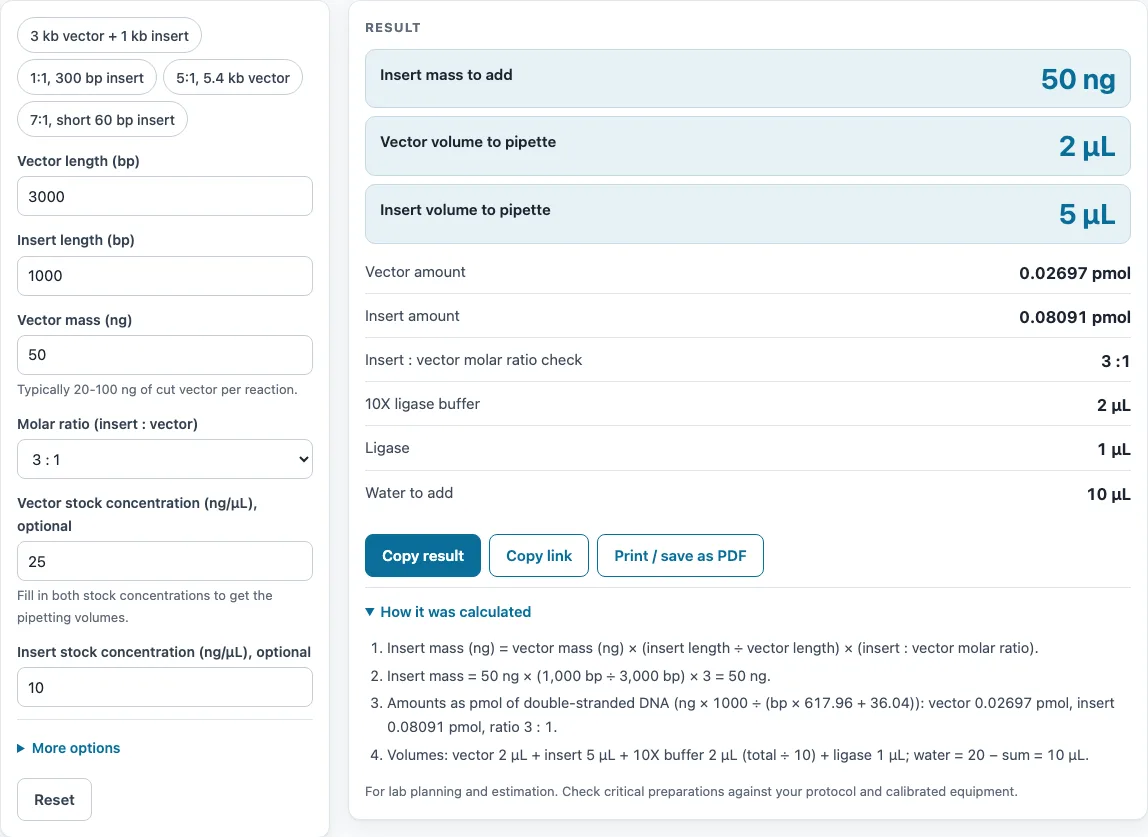
How to use the Ligation calculator
- Enter the mass of your cut vector in ng.
- Enter the vector length in base pairs (bp). Check that it is in bp, not kb.
- Enter the insert length in bp.
- Choose a molar ratio from 1:1, 3:1 (the common default), 5:1 or 7:1, or type a custom ratio.
- If you have stock concentrations, enter the vector and insert concentrations in ng/µL. The tool then gives the volumes to pipette.
- Enter the total reaction volume in µL and the ligase volume. The tool calculates the 10X ligase buffer (total ÷ 10), the ligase, and the water needed to make up the volume.
- Read the result: the insert mass, the pmol of vector and insert, the actual molar ratio, and, when both stock concentrations are given, the volumes of vector, insert, buffer, ligase and water.
- Check the warnings, then open “How it was calculated” to see the formula with your numbers.
- Try a preset, such as “3 kb vector + 1 kb insert” or “7:1, short 60 bp insert”, to see a complete example before you enter your own fragments.
The result can be copied with the result lines and a link using Copy result. Copy link copies the page address, which stores every input, so the same calculation reopens later. Print / save as PDF prints the inputs, results, calculation steps and the date.
What is the ligation calculation formula?
The formula is insert mass (ng) = vector mass (ng) × (insert length ÷ vector length) × molar ratio (insert : vector). It sets the insert mass so that the insert molecules outnumber the vector molecules by the ratio you chose.
For example, 50 ng of a 3,000 bp vector with a 1,000 bp insert at 3:1 needs 50 ng of insert. A short insert has a low molecular weight, so a few nanograms already contain as many molecules as a much larger mass of vector. That is why the insert mass scales with insert length ÷ vector length.
How much insert do I need for a 3:1 ligation?
Multiply the vector mass by the insert length divided by the vector length, then multiply by 3. In the tool’s example, 50 ng of a 3,000 bp vector and a 1,000 bp insert give 50 × (1,000 ÷ 3,000) × 3 = 50 ng of insert, which is 0.0809 pmol.
NEB’s T4 DNA ligase protocol uses 50 ng of a 4 kb vector in a 20 µL reaction. If the insert mass is too small to pipette, the tool shows a warning, so increase the vector mass or use a stock with a higher concentration.
What insert to vector ratio should I use?
The tool offers 1:1, 3:1, 5:1, 7:1 and custom ratios. 3:1 is the default, the insert:vector ratio in NEB’s T4 DNA ligase protocol (37.5 ng of a 1 kb insert to 50 ng of a 4 kb vector). The tool warns you above 20:1, far outside the usual range, so you can check the value.
Here is a 5:1 example. 100 ng of a 5,400 bp vector and an 800 bp insert need 74.07 ng of insert (0.15 pmol). A 1:1 example uses 50 ng of a 2,686 bp vector and a 300 bp insert, which needs 5.585 ng of insert (0.0301 pmol).
How do you calculate pmol of vector and insert?
Use the molecular weight of double-stranded DNA: MW (g/mol) = bp × 617.96 + 36.04. Then use this conversion:
- Find the molecular weight of the vector and of the insert from their lengths in bp.
- Divide the mass in ng by the molecular weight, then multiply by 1,000. This gives pmol.
- Divide the insert pmol by the vector pmol to check the actual molar ratio.
For 50 ng of a 3,000 bp vector, the MW is 3,000 × 617.96 + 36.04 = 1,853,916 g/mol, so the result is 50 ÷ 1,853,916 × 1,000 = 0.0270 pmol. The tool shows these values and the check on the actual ratio.
How do you set up a 20 µL ligation reaction?
Enter 20 µL as the total reaction volume. The 10X ligase buffer is 20 ÷ 10 = 2 µL. Add the ligase volume you entered, then add the vector and insert volumes calculated from their stock concentrations. Fill the rest with water to reach 20 µL.
If the vector, insert, buffer and ligase together exceed 20 µL, the tool warns you. Reduce the DNA volumes or use more concentrated stocks.
Sources
Formulas and data used by this calculator (checked October 2026):
- NEB, DNA ligation protocol with T4 DNA ligase (M0202)
- QIAGEN, dsDNA mass to moles converter (617.96 g/mol per bp + 36.04)
Worked examples
| Input | Result |
|---|---|
| 50 ng vector (3000 bp), insert 1000 bp, 3:1 | 50 ng insert (0.0809 pmol) |
| 100 ng vector (5400 bp), insert 800 bp, 5:1 | 74.07 ng insert (0.15 pmol) |
| 50 ng vector (2686 bp), insert 300 bp, 1:1 | 5.585 ng insert (0.0301 pmol) |
| 25 ng vector (4000 bp), insert 1500 bp, 7:1 | 65.63 ng insert (0.0708 pmol) |
| 50 ng vector (3500 bp), insert 1200 bp, 2:1 | 34.29 ng insert (0.0462 pmol) |
Calculated by the tool above with these values.
Frequently asked questions
Does this calculator predict ligation efficiency?
No. It calculates masses, pmol and volumes, but ligation efficiency depends on the DNA ends. Sticky ends ligate more easily than blunt ends. Dephosphorylated vector reduces self-ligation, and you should always include a vector-only control.
Why does the tool warn about ratios above 20:1?
A ratio that high is far above the 3:1 used in NEB’s protocol and is often a typing slip, for example a mass entered where a ratio was meant. Very high insert excess can also give products with several inserts. Check the value and lower the ratio to the level you need.
What does the warning for a vector under 500 bp mean?
A vector under 500 bp is often a sign that the length was entered in kb instead of bp. Check the vector length in bp. The same check applies to the insert: if the insert is much longer than the vector, the two lengths may have been swapped.
Can I use the results in commercial work?
Yes. Results may be used freely in commercial work, including reports, SOPs, quotes and product documentation. No attribution is required.
Should I use the same ratio for every insert?
No. Start with 3:1 for most inserts, try 1:1 or 5:1 if the first ligation gives few correct clones, and use higher ratios such as 7:1 for very short inserts and adapters. The calculator keeps the vector amount fixed, so you can compare ratios without changing the rest of the reaction.
Are my numbers uploaded anywhere?
No. The calculator runs entirely in your browser. Nothing is uploaded, and no sign-up is needed.
Related tools
- DNA molarity calculator: use it to convert a DNA mass to molar amount when you do not have a ligation set up.
- DNA concentration calculator: use it to work out the ng/µL of a DNA stock before you enter it here.
- Serial dilution calculator: use it to plan a stepwise dilution of a DNA stock to reach the concentration you need.
- Dilution calculator: use it to work out how much stock and diluent to mix for a target concentration.
- Protein molecular weight calculator: use it to estimate the molecular weight of a protein, such as a ligase or restriction enzyme.
- RPM to RCF calculator: use it to convert centrifuge speed from RPM to relative centrifugal force when you clean up DNA after a digest.
- All laboratory calculators: use it to browse every calculator on the site.