Molarity Calculator
Find the mass to weigh out, the molarity of a solution or the molarity of a concentrated stock; type a formula or the molecular weight.
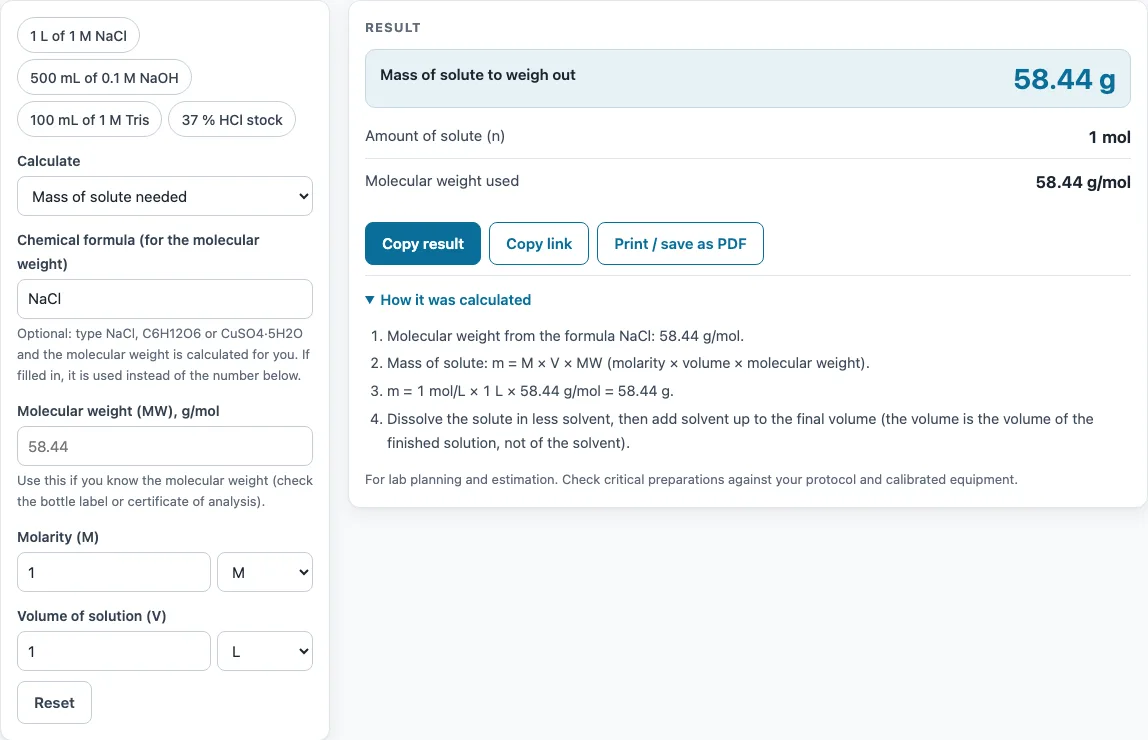
How to use the Molarity calculator
- Open the Calculate section and choose the mode that matches your problem.
- Enter the molecular weight (g/mol). You can type a number, or enter a chemical formula such as NaCl, C6H12O6 or CuSO4·5H2O. When a formula is filled in, the tool uses it.
- Enter your known values, selecting the unit for each one: molarity (M, mM, µM or nM), volume (L, mL, µL, US gal or fl oz), and mass (g, mg, µg, kg, oz or lb).
- For stock solutions, enter the % w/w and density (g/mL) instead of a mass.
- Read the result. The unit is chosen automatically to give a readable number.
- Open How it was calculated under the result to check the formula and each step with your numbers.
- Try the presets (1 L of 1 M NaCl, 500 mL of 0.1 M NaOH, 100 mL of 1 M Tris, 37 % HCl stock) to see each mode with real numbers.
If you use a hydrate, enter the formula exactly as it appears on the bottle, because CuSO4·5H2O needs more grams than anhydrous CuSO4 for the same molarity.
Use Copy result to copy the result lines with a link. Copy link copies the page address, which stores every input so the same calculation reopens later. Print / save as PDF prints the inputs, results, calculation steps and the date.
How do you calculate molarity?
Molarity (M) is moles of solute divided by litres of solution. To find it, divide the mass of solute by its molecular weight to get moles, then divide by the volume in litres. The tool uses molarity = mass ÷ (MW × volume), with the mass in grams, MW in g/mol and volume in litres.
How do you calculate the mass needed for a molar solution (calculating molarity using solute mass)?
Rearrange the formula to mass (g) = molarity (mol/L) × volume (L) × molecular weight (g/mol). For example, 1 L of 1 M NaCl needs 58.44 g, and 500 mL of 0.1 M NaOH needs 0.1 × 0.5 × 40 = 2 g. The same approach gives volume = mass ÷ (MW × molarity) when you know how much solute you have and need to find the final volume.
How do you convert mg/mL to molarity?
Since 1 mg/mL equals 1 g/L, divide the concentration in g/L by the molecular weight. For example, a solution at 1 mg/mL of NaCl (MW 58.44) is 1 ÷ 58.44 = 0.0171 M, or 17.1 mM. To go the other way, multiply molarity by MW to get g/L, then convert to mg/mL.
How do you find the molarity of concentrated HCl?
Use the stock formula: M = % w/w × density (g/mL) × 10 ÷ MW. For 37 % w/w HCl with a density of 1.19 g/mL and an MW of 36.46 g/mol, the molarity is 37 × 1.19 × 10 ÷ 36.46 = 12.08 M. Check the density and % on the label or safety data sheet for your specific bottle, since they vary by supplier.
What is the difference between molarity and molality?
Molarity is moles of solute per litre of solution, so it depends on the total volume. Molality is moles of solute per kilogram of solvent, so it depends only on the mass of the solvent. Molarity changes with temperature because liquid volume changes, while molality does not.
How do you make a 1 M solution?
Calculate the mass needed with mass = 1 mol/L × final volume × MW. For 1 L of 1 M NaCl, weigh out 58.44 g. Dissolve the solute in part of the solvent, then add solvent up to the final volume in a volumetric flask. Do not add the solute to a full litre of water, because the final volume will then be larger than 1 L and the molarity will be wrong.
Sources
Formulas and data used by this calculator (checked October 2026):
- OpenStax Chemistry 2e, 3.3 Molarity (dilution, C1V1 = C2V2)
- IUPAC CIAAW, abridged standard atomic weights (2024)
Worked examples
| Input | Result |
|---|---|
| NaCl, 1 M, 1 L | 58.44 g |
| NaOH, 0.1 M, 500 mL | 2 g |
| C4H11NO3, 12.11 g in 100 mL | 999.7 mM |
| MW 58.44, 5.844 g at 150 mM | 666.7 mL |
| HCl, 37 % w/w, 1.19 g/mL | 12.08 M |
Calculated by the tool above with these values.
Frequently asked questions
What does the molarity calculator do?
It calculates molarity, the mass of solute, the volume, or the molarity of a concentrated stock, depending on the mode you choose under Calculate. You enter the other known values and the tool solves for the one you need.
Can I enter a chemical formula instead of a molecular weight?
Yes. You can type a formula such as NaCl, C6H12O6 or CuSO4·5H2O, and the tool calculates the molecular weight from it. If you fill in a formula, the tool uses it.
Why does the tool warn me about my values?
Warnings appear for unusual molecular weights or densities, molarities higher than any solution can reach, masses over 100 kg, and masses under 1 mg. For very small masses, make a larger volume and dilute it instead.
Which units can I use?
Molarity can be entered in M, mM, µM or nM. Volume can be L, mL, µL, US gal or fl oz. Mass can be g, mg, µg, kg, oz or lb. The result unit is chosen automatically.
Is my data saved or sent anywhere?
Everything runs in your browser, so nothing is uploaded. The Copy link option stores your inputs in the page address, so anyone with that link can reopen the same calculation.
Can I use the results in reports or SOPs?
Yes. Results may be used freely in commercial work such as reports, SOPs, quotes and product documentation, and no attribution is required.
What does “How it was calculated” show?
It lists the formula used and each step with your numbers filled in. This helps you check the working or copy it into a lab notebook.
Related tools
- Dilution calculator - use it when you need to dilute a stock solution to a lower concentration.
- Molecular weight calculator - use it to find the molecular weight of a compound from its formula before calculating molarity.
- Mass to moles calculator - use it to convert a sample mass into moles.
- Concentration converter - use it to convert between different concentration units.
- Phosphate buffer calculator - use it to prepare phosphate buffers at a set pH and concentration.
- Titration calculator - use it to find an unknown concentration from titration volumes.
- DNA molarity calculator - use it to work out the molarity of DNA samples.
- All laboratory calculators - use it to browse every calculator on the site.