Phosphate Buffer Calculator
Pick the pH, concentration and volume to get the grams of each phosphate salt, the stock volumes to mix, or a PBS recipe.
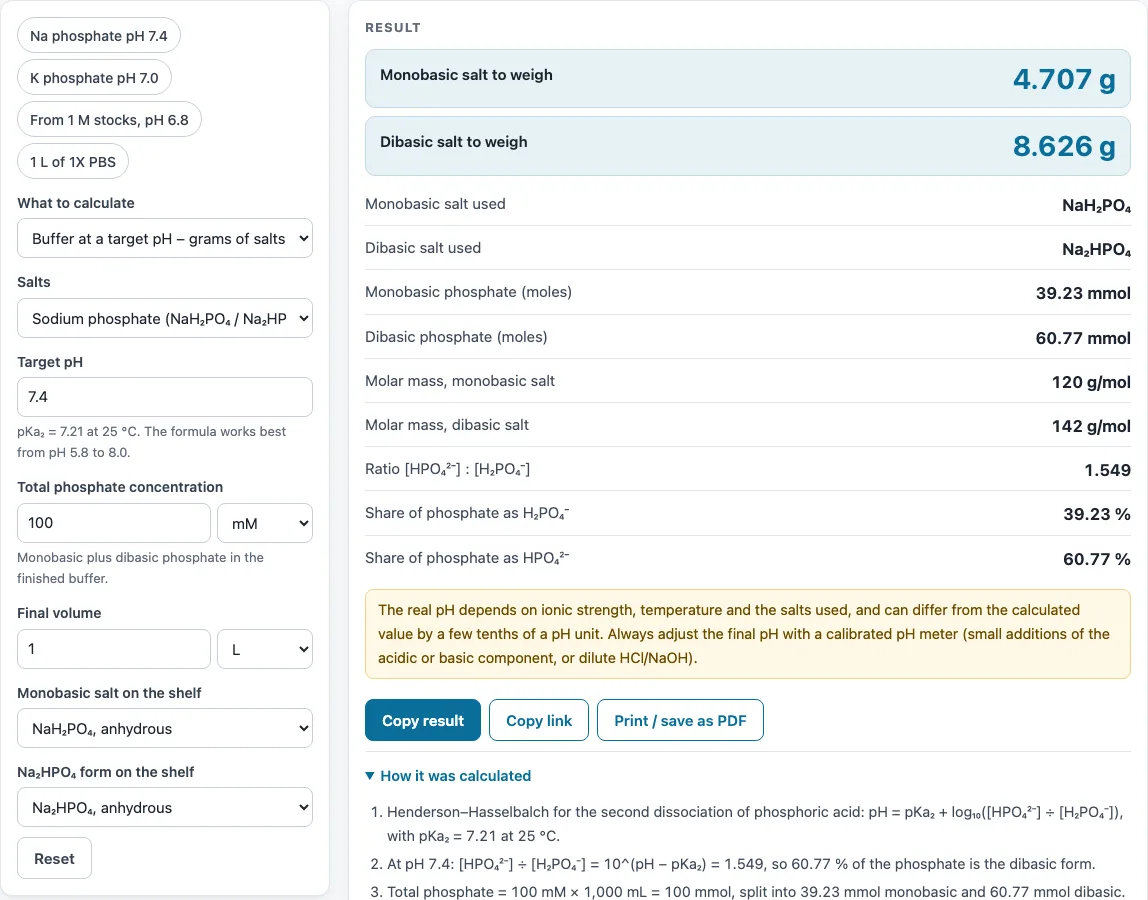
How to use the Phosphate buffer calculator
- Open What to calculate and choose a mode: buffer at a target pH (grams of salts to weigh), buffer from two stock solutions (volumes of each stock plus water), or PBS recipe.
- Choose sodium phosphate (NaH₂PO₄ / Na₂HPO₄) or potassium phosphate (KH₂PO₄ / K₂HPO₄).
- Select the hydrate that matches the salt on your shelf. The grams change with the hydrate, so this choice matters.
- Enter the target pH, the total phosphate concentration (M or mM) and the final volume (L or mL).
- In the two-stocks mode, also enter the concentration of your monobasic and dibasic stock solutions (for example 1 M each); the result gives the volume of each stock and the water to add.
- In PBS mode, pick the strength (1X, 2X, 5X or 10X) and the volume.
- Read the results: grams of each salt, moles, the molar masses used, and the [HPO₄²⁻]:[H₂PO₄⁻] ratio with the share of each form.
- Open How it was calculated under the result to see the formula with your own numbers.
Copy result copies the result lines with a link. Copy link copies the page address, which stores every input in the URL (?s=…), so the same calculation reopens later. Print / save as PDF prints the inputs, results, calculation steps and the date.
How do you make a phosphate buffer?
Make a phosphate buffer by weighing the monobasic and dibasic salts in the amounts the calculator gives, then dissolving them. Work in this order:
- Dissolve the salts in less than your final volume of water.
- Check the pH with a calibrated pH meter and adjust it to your target.
- Make up to the final volume with water.
How do you calculate the amount of monobasic and dibasic phosphate for a given pH?
The calculator uses the Henderson–Hasselbalch equation: pH = pKa₂ + log₁₀([HPO₄²⁻]/[H₂PO₄⁻]). Rearranged, the ratio of dibasic to monobasic form is 10^(pH − 7.20). The total phosphate (mM × volume) is then split into moles of each form, and each mole amount is multiplied by the molar mass of the chosen salt. At pH 7.20 the two forms are equal.
For example, pH 7.4, 50 mM total phosphate and 1 L gives 2.321 g NaH₂PO₄ and 4.352 g Na₂HPO₄.
What is the pKa of phosphate buffer?
The pKa used here is pKa₂ = 7.20 at 25 °C. It belongs to the second dissociation of phosphoric acid, the pair H₂PO₄⁻ and HPO₄²⁻. Phosphoric acid’s other pKa values lie far from neutral, so this pair sets the buffering range near pH 7.
Does the hydrate form matter?
Yes. Crystal water adds mass without adding phosphate, so the same number of moles needs more grams of a hydrated salt. For example, Na₂HPO₄·7H₂O has a molar mass of 268.06 g/mol, compared with 141.96 g/mol for the anhydrous form. Always select the exact hydrate printed on your bottle.
How do you mix a phosphate buffer from two stock solutions?
Many labs keep 1 M stocks of the monobasic and dibasic salts and mix them instead of weighing each time. The calculator splits the total phosphate in the same way, then divides the moles of each form by its stock concentration. For 1 L of 100 mM sodium phosphate at pH 6.8 from two 1 M stocks, that is 71.53 mL of monobasic stock plus 28.47 mL of dibasic stock, made up with 900 mL of water. If the two stock volumes would add up to more than the final volume, the calculator says so and suggests stronger stocks or a lower concentration.
Sources
Formulas and data used by this calculator (checked October 2026):
- Phosphoric acid: pKa values (pKa₂ 7.20)
- Sigma-Aldrich, Buffer Reference Center (phosphate buffer, pH 5.8–8.0)
- Cold Spring Harbor Protocols, Phosphate-buffered saline (PBS) (2006)
- IUPAC CIAAW, abridged standard atomic weights (2024)
Worked examples
| Input | Result |
|---|---|
| pH 7.20, 100 mM total phosphate, 25 mL | NaH₂PO₄ 150 mg; Na₂HPO₄ 177.4 mg |
| pH 7.4, 50 mM total phosphate, 1 L | NaH₂PO₄ 2.321 g; Na₂HPO₄ 4.352 g |
| pH 7.0, 100 mM total phosphate, 500 mL | KH₂PO₄ 4.172 g; K₂HPO₄ 3.369 g |
| pH 6.8, 100 mM total phosphate, 1 L | 71.53 mL monobasic stock + 28.47 mL dibasic stock + 900 mL water |
| 1X PBS, 1 L | NaCl 8.006 g; KCl 201.3 mg; Na₂HPO₄·7H₂O 2.681 g; KH₂PO₄ 245 mg |
Calculated by the tool above with these values.
Frequently asked questions
Why is my measured pH different from the calculated pH?
The calculated pH is an estimate. The real pH depends on ionic strength and temperature and can differ by a few tenths. Adjust the final pH with a calibrated pH meter, and for concentrates, check the pH on a 1X dilution.
How do I make 1X PBS?
Choose PBS recipe mode and select 1X. For 1 L of 1X with anhydrous Na₂HPO₄, the amounts are 8.006 g NaCl, 0.201 g KCl, 1.420 g Na₂HPO₄ and 0.245 g KH₂PO₄. Dissolve the salts in less than 1 L of water, adjust the pH, then make up to 1 L.
Can I make a potassium phosphate buffer?
Yes. Select potassium phosphate (KH₂PO₄ / K₂HPO₄) and the matching hydrate. For example, pH 7.0, 100 mM total phosphate and 500 mL gives 4.209 g KH₂PO₄ and 3.322 g K₂HPO₄.
What pH range can a phosphate buffer cover?
The H₂PO₄⁻/HPO₄²⁻ pair buffers well from about pH 5.8 to 8.0, within roughly one unit of pKa₂. The calculator warns outside that range, because one form is then almost absent and the mixture resists pH changes poorly.
Can I use the results in commercial work?
Yes. Results may be used freely in reports, SOPs, quotes and product documentation, and no attribution is required.
Related tools
- Dilution calculator - use it to work out how much stock to mix with water to reach a lower concentration.
- Molarity calculator - use it to find the grams of a salt needed for a solution of a set molarity.
- Molecular weight calculator - use it to check the molar mass of a salt or hydrate.
- Concentration converter - use it to switch between units such as M, mM and g/L.
- Buffer calculator - use it for acetate, Tris, MOPS and other buffers, or to find the pH from acid and base concentrations.
- Titration calculator - use it when you need to work out an acid or base volume for a neutralisation.
- All laboratory calculators - use it to browse the full set of tools on this site.