Protein Concentration Calculator (A280)
Enter the A280 reading and the protein's extinction coefficient, or its sequence, to get mg/mL and µM.
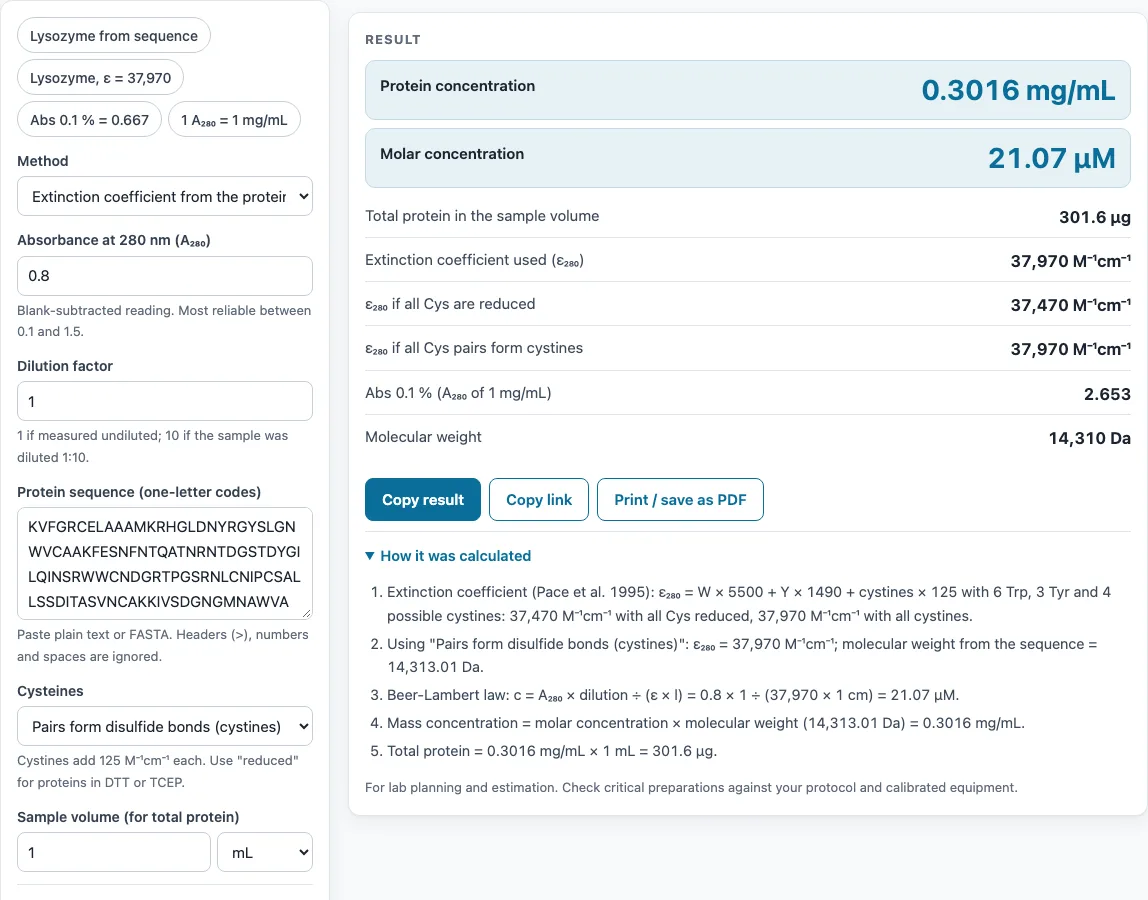
How to use the Protein concentration calculator
- Enter your A280 reading from the spectrophotometer.
- Enter the dilution factor. If you did not dilute the sample before measuring, use 1.
- Set the path length. Use 1 cm for a standard cuvette. Many microvolume instruments use 1 mm or 0.5 mm, and the tool corrects for these.
- Choose a method for the extinction coefficient: calculated from the protein sequence, a known ε280 in M⁻¹cm⁻¹, a known Abs 0.1 %, or the quick estimate 1 A280 ≈ 1 mg/mL.
- For the sequence method, paste the protein sequence and choose reduced or cystine. The tool shows both values.
- Check the molecular weight. The tool calculates it from the sequence, or you can type your own value.
- Optionally enter a sample volume to get the total amount of protein in mg or µg, for example before you load a column or set up a crystallization tray.
- Read the result in mg/mL and µM. Open “How it was calculated” under the result to see each step with your numbers.
Copy result copies the result lines and a link to the calculation. Copy link copies the page address, which stores every input (in the ?s= parameter), so the same calculation reopens later. Print / save as PDF prints your inputs, results, calculation steps and the date.
How do you calculate protein concentration from A280?
Protein concentration from A280 comes from the Beer–Lambert law. Divide A280 by the extinction coefficient (ε) and path length, then multiply by the dilution factor: molar concentration c = A280 × dilution ÷ (ε × path length). Multiply c by the molecular weight to get mg/mL. For lysozyme, with ε280 = 37,970 M⁻¹cm⁻¹ and A280 = 0.8 in a 1 cm path, c is 21.07 µM, which is 0.3016 mg/mL.
How do you calculate the extinction coefficient of a protein?
You calculate the extinction coefficient from the number of residues that absorb at 280 nm. The tool uses the Pace et al. (1995) method: ε280 = (number of W × 5,500) + (number of Y × 1,490) + (number of cystines × 125). Count tryptophans (W) and tyrosines (Y) in the sequence, and count cystines, which are disulfide-bonded cysteine pairs. Lysozyme has 6 W, 3 Y and 4 cystines: 33,000 + 4,470 + 500 = 37,970 M⁻¹cm⁻¹.
What is Abs 0.1 %?
Abs 0.1 % is the absorbance at 280 nm of a 1 mg/mL solution measured in a 1 cm path. Because it is based on mass, it converts A280 directly to mg/mL without a molecular weight step. It equals ε ÷ MW. The formula is mg/mL = A280 × dilution ÷ (Abs 0.1 % × path length). Using the lysozyme example above, an A280 of 0.5 gives 0.1885 mg/mL, or 13.17 µM.
Is 1 A280 equal to 1 mg/mL?
Only roughly. The rule 1 A280 ≈ 1 mg/mL is a quick estimate, and the tool labels it approximate. Real proteins differ, depending on how many W, Y and cystine residues they contain: a 1 mg/mL solution reads about 0.67 for BSA and 1.37 for IgG. For example, A280 0.9 with a dilution factor of 5 gives 4.5 mg/mL under this rule. Use the estimate for rough checks only, and use the sequence, ε280 or Abs 0.1 % method for reported values.
Should I use the reduced or cystine extinction coefficient?
Use reduced if your protein is in a reducing agent such as DTT or TCEP, because these break disulfide bonds and leave cysteines free. The reduced value has no cystine term. Use the cystine value if the disulfide bonds are intact and cysteines are paired. Each cystine adds 125 M⁻¹cm⁻¹, so the difference is small for proteins with few disulfides. If your sequence has an odd number of cysteines, the tool warns you, because not every cysteine can be paired.
Sources
Formulas and data used by this calculator (checked October 2026):
- ExPASy ProtParam (residue masses; Pace et al. 1995 extinction coefficient)
- Implen, technical note on protein UV measurements (A260/A280 of protein)
- Eppendorf, verification of photometric measurement values (linear range)
Worked examples
| Input | Result |
|---|---|
| A₂₈₀ = 0.8 | 0.3016 mg/mL, 21.07 µM |
| A₂₈₀ = 0.65, Dilution factor 10 | 2.483 mg/mL, 173.5 µM |
| A₂₈₀ = 0.5 | 0.1885 mg/mL, 13.17 µM |
| A₂₈₀ = 1.2 | 1.799 mg/mL |
| A₂₈₀ = 0.9, Dilution factor 5 | 4.5 mg/mL |
Calculated by the tool above with these values.
Frequently asked questions
What if my protein has no tryptophan or tyrosine?
A protein with no W or Y barely absorbs at 280 nm, so A280 and the sequence method will not be reliable. The tool shows a warning in this case. Use a colorimetric protein assay instead.
Why is my A280 reading too high for pure protein?
Nucleic acid contamination raises A280. Check the A260/A280 ratio, which is around 0.57 for purified protein (Implen technical note on protein UV measurements). A higher ratio suggests DNA or RNA in the sample.
Is the calculator reliable if my A280 is above 2?
Readings outside the linear range of your photometer are less reliable; Eppendorf gives 0.1 to 1.0 A as the usual range, and some instruments are specified from 0.05 to 2.0 A. Dilute the sample so the reading falls in that range, then enter the dilution factor so the tool corrects for it.
Which buffer should I use as the blank?
Use the same buffer the protein is in, measured in the same cuvette or on the same pedestal. Additives such as imidazole, detergents or high concentrations of DTT absorb near 280 nm and must be subtracted.
Can I use the results in commercial work?
Yes. Concentrations, steps and printouts may be used freely in reports, batch records, SOPs and product documentation, and no attribution is required.
Does the calculator upload my sequence or results?
No. Everything runs in your browser, and nothing is uploaded. No sign-up is needed. The Copy link option stores your inputs in the page address, so anyone who opens that link will see the same inputs.
Related tools
- Protein molecular weight calculator: use it to get the molecular weight of a protein from its sequence when you need mg/mL values.
- DNA concentration calculator: use it when your sample contains nucleic acid and you need to work out its concentration.
- Dilution calculator: use it to work out the dilution factor before you measure A280.
- Molarity calculator: use it to convert between mass and molar amounts for solutions you prepare.
- Serial dilution calculator: use it to plan a series of dilutions for a standard curve or assay.
- Concentration converter: use it to convert between mg/mL, µM and other concentration units.
- All laboratory calculators: use it to browse every calculator on the site.