Sig Fig Calculator
Count significant figures, round to a chosen number of sig figs, or do arithmetic with the sig fig rules.
The sig fig calculator counts the significant figures in a number, rounds a number to a set count of significant figures, and applies significant figure rules to addition, subtraction, multiplication and division. Whether you search for a sig figs calculator, a sigfig calculator or a scientific digits calculator, this page does the same job. Enter a number as you measured it, keeping any trailing zeros, and the tool shows the count along with the reason for each digit.
Everything runs in your browser. Nothing is uploaded, there is no sign-up, and the tool is free to use. It suits chemistry and physics homework as well as lab work, where the number of significant figures in a result should match the precision of the balance, pipette or instrument that produced the data.
How to use the Sig Fig Calculator
- Choose a mode: count the significant figures of a number, round a number to N significant figures, or add, subtract, multiply or divide with significant figure rules.
- Type each number exactly as measured, keeping trailing zeros. For example, type 0.004050, not 0.00405. Scientific notation works too: 1.50e3 or 6.022×10^23.
- For rounding, enter the number of significant figures you need.
- For arithmetic, enter up to three numbers and choose one operation (add, subtract, multiply or divide). The tool applies it from left to right and shows a table with the decimal places and significant figures of each number, so you can see which one limits the answer.
- If a number such as 1500 has trailing zeros and no decimal point, the tool marks it as ambiguous and gives every possible reading instead of guessing.
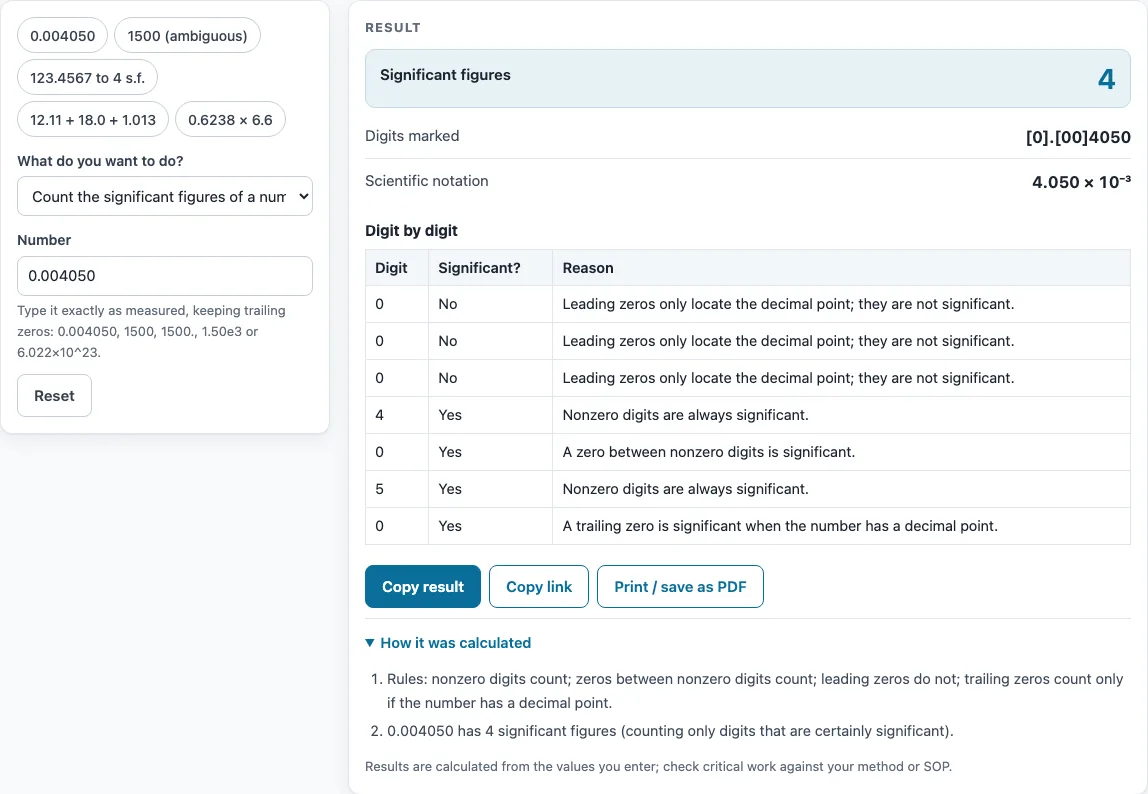
- Read the result, then open “How it was calculated” to see the formula and each step with your numbers. For counting, check the digit-by-digit table, or the marked version, where non-significant digits appear in [ ].
Copy result copies the result lines plus a link. Copy link copies the page address, which stores every input in the address (?s=…), so the same calculation reopens later. Print / save as PDF prints the inputs, results, calculation steps and the date.
How do you count significant figures?
Count every nonzero digit, since nonzero digits are always significant. Zeros between nonzero digits, called captive zeros, are also significant. Leading zeros only show where the decimal point sits, so they never count. For example, 0.004050 has 4 significant figures, written as 4.050 × 10⁻³.
Are trailing zeros significant?
Yes, when the number has a decimal point. In 2.50 there are three significant figures, and in 25.0 there are also three. Without a decimal point, trailing zeros are ambiguous, as the next section explains for 1500.
How do you round to significant figures?
Count from the first nonzero digit and keep the number of digits you need. Look at the digit just after the last one you keep. If it is 5 or more, round up. This is rounding half up. For example, 123.4567 to 4 significant figures is 123.5, or 1.235 × 10² in scientific notation.
What are the sig fig rules for addition and subtraction?
The answer keeps the fewest decimal places of the numbers you combine, not the fewest significant figures. For example, 1.0023 + 4.383 = 5.3853 before rounding. The number 4.383 has three decimal places, so the answer is 5.385.
What are the sig fig rules for multiplication and division?
The answer keeps the fewest significant figures of the numbers you combine. For example, 0.6238 × 6.6 = 4.11708 before rounding. The number 6.6 has two significant figures, so the answer is 4.1.
How many significant figures does 1500 have?
It has between 2 and 4, because the trailing zeros might only be placeholders. Write 1.5 × 10³ to show 2 significant figures, 1.50 × 10³ for 3, or 1500. with a trailing decimal point for 4. The tool shows the range and these three notations.
Worked example: adding three measurements
Suppose three masses are added: 12.11 g + 18.0 g + 1.013 g. The raw sum is 31.123 g. The decimal places are 2, 1 and 3, and the fewest is 1 (from 18.0 g), so the answer is 31.1 g. Notice that the answer has 3 significant figures although 1.013 has 4 and 12.11 has 4: for sums the decimal places decide, not the count of significant figures. If the same numbers were multiplied, the rule would switch to the fewest significant figures, which is 3 for 18.0.
Sources
Formulas and data used by this calculator (checked October 2026):
Worked examples
| Input | Result |
|---|---|
| 0.004050 | 4 significant figures |
| 1500 | 2 to 4 significant figures |
| 123.4567 to 4 s.f. | 123.5 |
| 1.0023 + 4.383 | 5.385 (unrounded 5.3853) |
| 0.6238 × 6.6 | 4.1 (unrounded 4.11708) |
Calculated by the tool above with these values.
Frequently asked questions
What rounding method does the tool use?
It rounds half up, so a digit of 5 or more rounds the last kept digit up. It works from the decimal digits you type, which avoids small binary floating-point errors.
Do exact numbers limit the answer?
No. Counted items and defined conversion factors have unlimited significant figures, so they do not reduce the number of significant figures in your answer.
Why should I round only the final answer?
Rounding intermediate steps can change the last digit of the result. The tool keeps full precision through the calculation and rounds only the final answer.
Does a zero after the decimal point count?
Yes, when it comes after a nonzero digit: 2.50 has three significant figures and 2.500 has four. Leading zeros such as those in 0.0025 never count, however many there are.
How many numbers can I enter for arithmetic?
You can enter up to three numbers, and the tool applies the same operation from left to right.
Can I use the results in commercial work?
Yes. You may use results freely in commercial work such as reports, SOPs, quotes and product documentation. No attribution is required.
Can I enter numbers in scientific notation?
Yes. Type forms such as 1.50e3 or 6.022×10^23. Keep the trailing zeros in the mantissa, because they count as significant figures.
Related tools
- Molarity calculator: use it to find the molar concentration of a solution from moles of solute and volume.
- Molecular weight calculator: use it to find the molar mass of a compound from its formula.
- Mass to moles calculator: use it to convert a measured mass into moles of a substance.
- Percent recovery calculator: use it to compare the amount recovered in a procedure with the amount expected.
- Titration calculator: use it to work out an unknown concentration from titration volumes.
- Concentration converter: use it to convert a concentration from one unit to another.
- All laboratory calculators: use it to browse every calculator on the site.