Formulas for Stress and Strain: Stress Strain Calculator
Enter the force, cross-section and lengths to get stress, strain and Young's modulus, or use Hooke's law.
This stress strain calculator applies the standard formulas for stress and strain to your force, length and area data. Engineering stress is σ = F ÷ A0 (force divided by original cross-sectional area), engineering strain is ε = ΔL ÷ L0 (change in length divided by original length), and Young’s modulus is E = σ ÷ ε.
The tool runs in your browser, is free, and needs no sign-up. You can find stress, strain and Young’s modulus from test data, calculate stress from strain and modulus using Hooke’s law, or work out how far a bar will stretch under a given force. Results are shown in MPa or psi depending on your inputs, and the calculation steps appear beneath them.
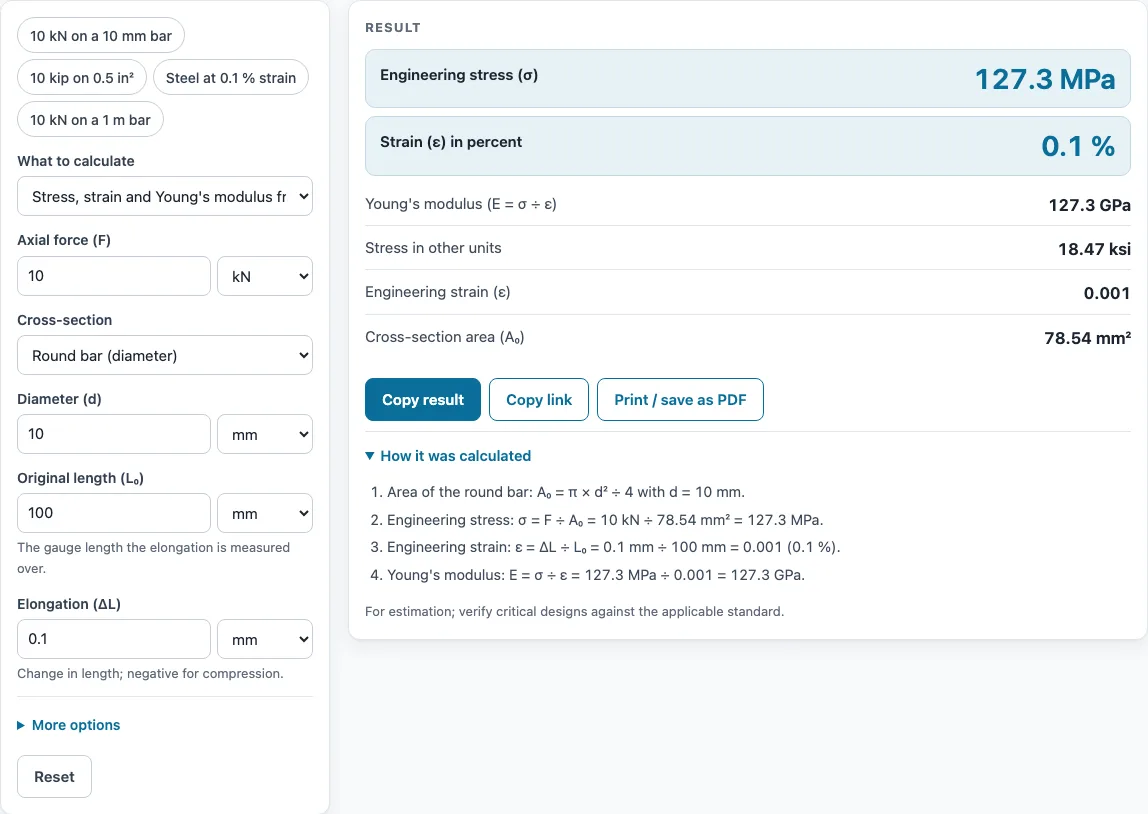
How to use the Stress Strain Calculator
- Choose a mode: stress, strain and Young’s modulus from test data; stress from strain and modulus (Hooke’s law); or elongation from force, modulus and size.
- Pick the cross-section shape: rectangle (width × thickness), round bar (diameter), tube (outer and inner diameter), or type the area directly.
- Enter the force and select its unit: N, kN, kgf, lbf or kip.
- Enter the original length L₀ and the elongation ΔL, selecting mm, cm, m or in. For compression, enter a negative elongation and a negative force.
- Enter the strain in its unit (fraction, %, mm/mm, in/in or microstrain µε) when the mode uses strain.
- For modulus values, select MPa, GPa, psi, ksi or N/mm². Steel is about 200 GPa (29,000 ksi) and aluminum about 70 GPa, but use the value for your own material.
- Tick “Also show true stress and true strain” if you need them.
- Read the results. US inputs give psi and ksi, other inputs give MPa and GPa, and the stress is also shown in the other unit system. Open “How it was calculated” to check each step with your numbers.
Copy result copies the result lines plus a link. Copy link copies the page address, which stores every input in the address (?s=…), so the same calculation reopens later. Print / save as PDF prints the inputs, results, calculation steps and the date.
What are the formulas for stress and strain?
Stress is force spread over an area, and strain is the change in length relative to the original length. Engineering stress is σ = F ÷ A0, where F is the force and A0 is the original cross-sectional area. Engineering strain is ε = ΔL ÷ L0, where ΔL is the change in length and L0 is the original length. Strain has no unit of its own, so it can be written as a fraction, a percentage, mm/mm, in/in or microstrain (µε).
Within the linear-elastic range, the two are linked by Young’s modulus, E = σ ÷ ε. Rearranging gives σ = E × ε (Hooke’s law) and ΔL = F × L0 ÷ (A0 × E). Hooke’s law only applies below yield, which is about 0.2 % plastic strain for many metals. Strain above 100 % falls outside these small-strain formulas. If the elongation is zero, E cannot be calculated because it would require dividing by zero.
How do you calculate stress from force and area?
Divide the force by the original cross-sectional area, making sure the units match. The area depends on the shape. A rectangle has A = width × thickness, a round bar has A = π d² ÷ 4, and a tube has A = π (D² − d²) ÷ 4. Because 1 MPa = 1 N/mm², a force in newtons and an area in mm² give stress in MPa directly.
For example, take a 10 kN force on a round bar 10 mm in diameter. The area is π × 10² ÷ 4 = 78.5 mm², so σ = 10,000 N ÷ 78.5 mm² = 127.3 MPa. If the bar has L0 = 100 mm and ΔL = 0.1 mm, then ε = 0.1 ÷ 100 = 0.001, which is 0.1 %. Dividing stress by strain gives E = 127.3 MPa ÷ 0.001 = 127.3 GPa.
Sources
Formulas and data used by this calculator (checked October 2026):
- OpenStax University Physics Vol. 1, 12.3 Stress, strain and elastic modulus (Table 12.1)
- NIST Special Publication 811, unit conversion factors
Worked examples
| Input | Result |
|---|---|
| Force 10 kN, L₀ = 100 mm, ΔL = 0.1 mm | σ = 127.3 MPa; ε = 0.1 %; E = 127.3 GPa |
| Force 10 kip, L₀ = 10 in, ΔL = 0.01 in | σ = 20 ksi; ε = 0.1 %; E = 20,000 ksi |
| E = 200 GPa, ε = 0.1 % | σ = 200 MPa |
| Force 10 kN, L₀ = 1 m, E = 200 GPa | ΔL = 0.5 mm; σ = 100 MPa |
| Force 100 kN, L₀ = 200 mm, ΔL = 0.1 mm | σ = 141.5 MPa; ε = 0.05 %; E = 282.9 GPa |
Calculated by the tool above with these values.
Frequently asked questions
How do you calculate strain?
Divide the change in length by the original length: ε = ΔL ÷ L0. Use the same length unit for both values. For example, an elongation of 0.1 mm on a 100 mm length gives a strain of 0.001, or 0.1 %.
How do you find Young’s modulus from a stress-strain test?
Calculate E = σ ÷ ε using points from the straight, linear part of the curve, where stress and strain are proportional. Choose the mode for test data and enter the force, area, elongation and original length. Points beyond yield will not give a valid modulus.
What is the difference between engineering and true stress?
Engineering stress uses the original area and length, while true stress uses the area and length as they are during the test. The tool converts them with σ_true = σ(1 + ε) and ε_true = ln(1 + ε). These conversions are only valid until necking starts.
What units are used for stress?
Stress is commonly given in MPa, which equals N/mm², or in psi and ksi in US practice. One ksi equals 6.895 MPa. Modulus uses the same stress units, often expressed in GPa or ksi.
How do I calculate compression with this tool?
Enter a negative elongation and a negative force. Keep the signs consistent, because opposite signs for force and elongation give a negative modulus, which is not a valid result for this calculation.
Can I use these results in a report or design?
Results are for estimation. Verify critical designs against the applicable standard. Results may be used freely in commercial work, including reports, SOPs, quotes and product documentation, with no attribution required.
Related tools
- Specific gravity calculator: use it to work out density ratios when you need a material property for a calculation.
- RPM to RCF calculator: use it to convert centrifuge speed to relative centrifugal force.
- Significant figures calculator: use it to round your stress and strain results to the correct number of significant figures.
- Percent recovery calculator: use it to find how much of a sample you recovered in a process.
- Concentration converter: use it to convert between concentration units for solutions.
- All laboratory calculators: use it to browse every calculator on the site.