Titration Calculator
Find the analyte concentration from the endpoint volume, the volume to equivalence, or draw the titration curve.
The Titration Calculator is a free equivalence point calculator and titration curve simulator. It works in three modes: it finds the unknown concentration of a solution from the endpoint volume, it works out the titrant volume needed to reach equivalence, and it plots pH against titrant volume as a titration curve. Everything runs in your browser. Nothing is uploaded, and no sign-up is needed.
Curve mode covers four cases: strong acid with strong base, weak acid with strong base, strong base with strong acid, and weak base with strong acid. It reports the equivalence point volume and pH, the half-equivalence pH, the starting pH, and a drawn curve with both key points marked. The concentration and volume modes use the mole ratio from your balanced equation, so the same tool handles a simple 1:1 reaction or a reaction such as sulfuric acid with sodium hydroxide.
How to use the Titration Calculator
- Choose a mode: unknown concentration from the endpoint volume, titrant volume needed to reach equivalence, or titration curve (pH vs volume).
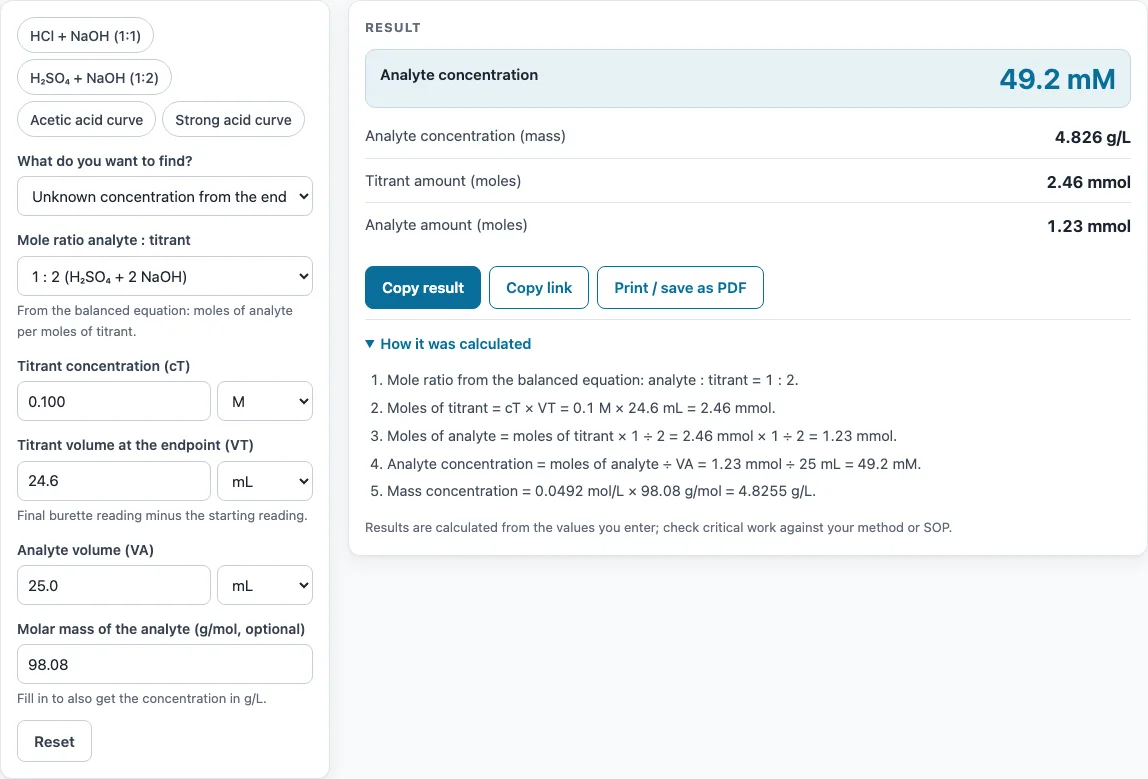
- For the concentration mode, enter the titrant concentration (cT), the titrant volume at the endpoint (VT) and the analyte volume (VA), each with its unit (M, mM or µM; mL, L or µL).
- Pick the mole ratio from the balanced equation: 1:1, 1:2, 1:3, 2:1, 5:2, or a custom ratio. For H₂SO₄ reacting with 2 NaOH, choose 1:2.
- For the volume mode, enter the analyte concentration and volume, the titrant concentration, and the mole ratio. The result is the titrant volume to equivalence.
- For the titration curve mode, select the acid or base type and enter the concentrations and volumes. Enter the pKa of the weak acid, or the pKa of the conjugate acid BH⁺ for a weak base. Optionally enter a volume to read the pH at that point.
- Read the result, then open “How it was calculated” below it to see the formula and each step with your numbers.
- Check the warning if the titrant volume is above 50 mL, which is the size of a standard burette.
Use Copy result to copy the result lines with a link, or Copy link to copy the page address. That address stores every input in the ?s= parameter, so opening it reloads the same calculation. Print / save as PDF prints the inputs, results, calculation steps and the date.
How do you calculate the concentration from a titration?
The titration calculation formula has three steps. First, find the moles of titrant: moles of titrant = cT × VT, where cT is the titrant concentration in mol/L and VT is the volume in litres. Second, convert those moles to moles of analyte with the mole ratio: moles of analyte = moles of titrant × (analyte part ÷ titrant part). Third, divide by the analyte volume: cA = moles of analyte ÷ VA.
At the endpoint, the titrant and analyte have reacted in exactly the proportion set by the balanced equation, which is why the mole ratio appears in the second step. If you use millilitres and millimoles, the result comes out directly in mM, so you avoid converting units.
How do you find the equivalence point?
The equivalence point is the stage where the titrant and analyte have reacted in exactly the mole ratio of the balanced equation. To find the titrant volume needed to get there, rearrange the formula: VT = cA × VA × (titrant part ÷ analyte part) ÷ cT. For 25 mL of 0.1 M analyte titrated with 0.1 M titrant in a 1:1 reaction, VT = 25 mL. When the concentrations and the ratio are equal, the volumes are equal too, which makes a quick check.
In curve mode, the equivalence point is the added volume at which the base added equals the acid present (or the reverse for a base). The tool marks it on the graph, together with the half-equivalence point, which lies at half that volume. The pH is solved exactly from the charge balance, using Kw = 1.0 × 10⁻¹⁴ at 25 °C, rather than from a rough approximation.
Sources
Formulas and data used by this calculator (checked October 2026):
- OpenStax Chemistry 2e, 4.5 Quantitative chemical analysis (titration)
- OpenStax Chemistry 2e, 14.7 Acid-base titrations
Worked examples
| Input | Result |
|---|---|
| 0.1 M × 24.6 mL, 25 mL, 1:2 | 49.2 mM |
| 0.1 M × 18.45 mL, 20 mL, 1:1 | 92.25 mM |
| 0.1 M × 25 mL, 0.1 M | 25 mL |
| Weak acid titrated with strong base, 0.1 M × 25 mL, 0.1 M | equivalence at 25 mL, pH 8.72 |
| Strong acid titrated with strong base, 0.1 M × 25 mL, 0.1 M | equivalence at 25 mL, pH 7 |
Calculated by the tool above with these values.
Frequently asked questions
What is a titration calculation example?
Take 0.100 M NaOH, 24.6 mL at the endpoint, and 25.0 mL of H₂SO₄ with a 1:2 ratio. The NaOH moles are 0.100 × 24.6 = 2.46 mmol, so the H₂SO₄ moles are 2.46 × 1/2 = 1.23 mmol. Dividing by 25.0 mL gives 0.0492 M, or 49.2 mM. At a molecular weight of 98.08 g/mol, that is 4.826 g/L.
What is the pH at the equivalence point?
It depends on the reaction. For a strong acid with a strong base, the pH at equivalence is 7. For a weak acid with a strong base, the pH is above 7 because the conjugate base reacts with water (hydrolyses) to produce OH⁻. The tool’s example, 25 mL of 0.1 M acetic acid (pKa 4.74) titrated with 0.1 M NaOH, gives an equivalence point at 25 mL and pH 8.72.
Why is pH equal to pKa at half-equivalence?
At half-equivalence, half of the weak acid has become its conjugate base, so [HA] = [A⁻]. The Henderson–Hasselbalch equation, pH = pKa + log([A⁻]/[HA]), then gives log(1) = 0, so pH = pKa. This means you can read the pKa of a weak acid straight from the half-equivalence pH on a curve.
How do you use the mole ratio in a titration?
Take the coefficients from the balanced equation. The first number is the analyte and the second is the titrant. HCl with NaOH is 1:1, H₂SO₄ with 2 NaOH is 1:2, and H₃PO₄ with 3 NaOH is 1:3. Oxalate titrated with permanganate is 5:2, and 2:1 covers a base such as NaOH titrated with H₂SO₄. If your reaction is not in the list, choose custom and enter the ratio yourself.
What happens if the titrant volume is over 50 mL?
The tool shows a warning, because a standard burette holds 50 mL. If you see it, use a more concentrated titrant or a smaller sample volume to bring the required volume into range.
Is my data sent anywhere?
No. Everything runs in your browser, nothing is uploaded, and no sign-up is needed. Results can be used freely in commercial work such as reports, SOPs, quotes and product documentation, with no attribution required.
Related tools
- Molarity calculator: use it to prepare a titrant or analyte solution at a known molar concentration.
- Phosphate buffer calculator: use it when you need the pH of a buffer made from phosphate salts.
- pH calculator: use it to find the pH of a strong or weak acid or base before you titrate it.
- Dilution calculator: use it to reduce a stock solution to a concentration suitable for a titration.
- Molecular weight calculator: use it to find the molar mass needed to convert mM results to g/L.
- Significant figures calculator: use it to round your titration result to the correct number of significant figures.
- Concentration converter: use it to switch a titration result between M, mM, g/L and other units.
- All laboratory calculators: use it to browse every calculator on the site.